7 Additional Data Structures in R
7.1 Objectives
The objective of this module is to introduce additional fundamental data structures in R (matrices, arrays, lists, data frames, and the like) and to learn how to extract, filter, and subset data from them.
7.2 Preliminaries
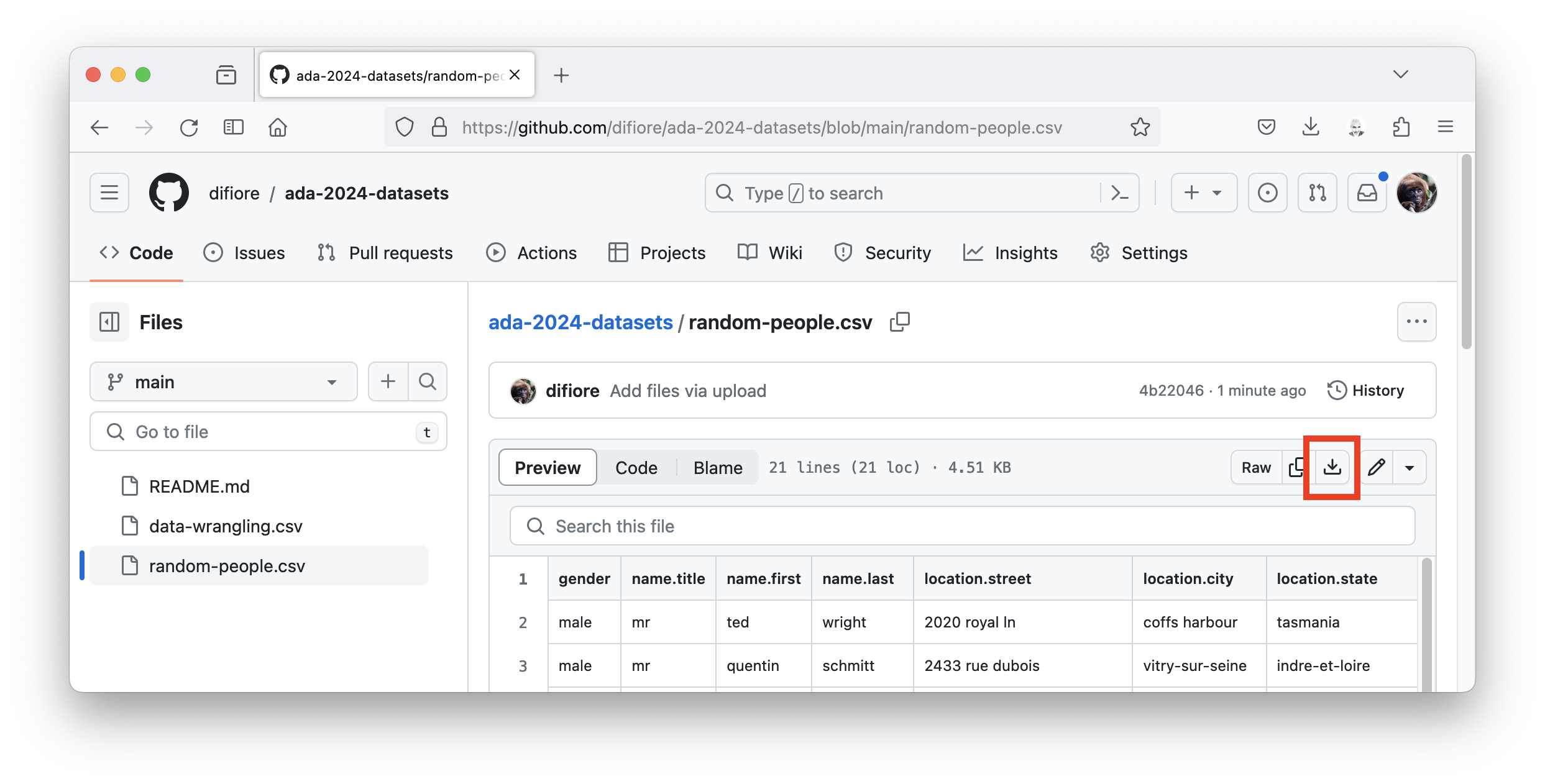
- GO TO: https://github.com/difiore/ada-datasets, select the “random-people.csv” file, then press the “Download” button and save the file to your local computer (e.g., on your desktop).
Alternatively, you can press the “Raw” button, highlight, and copy the text to a text editor, and save it. RStudio, as we have seen, has a powerful built-in text editor. There are also a number of other excellent text editors that you download for FREE (e.g., BBEdit for MacOS, Notepad++ for Windows, or Visual Studio Code for either operating system).
- Install and load these packages in R: {tidyverse} (which includes {ggplot2}, {dplyr}, {readr}, {tibble}, and {tidyr}, plus others, so they do not need to be installed separately) and {data.table}
7.3 Matrices and Arrays
So far, we have seen several way of creating vectors, which are the most fundamental data structures in R. Today, we will explore and learn how to manipulate other fundamental data structures, including matrices, arrays, lists, and data frames, as well as variants on data frames (e.g., data tables and “tibbles”.)
NOTE: The kind of vectors we have been talking about so far are also sometimes referred to as atomic vectors, and all of the elements of a vector have to have the same data type. We can think of lists (see below) as a different kind of vector, where the elements can have different types, but I prefer to consider lists as a different kind of data structure. Wickham (2019) Advanced R, Second Edition discusses the nuances of various R data structures in more detail.
Matrices and arrays are extensions of the basic vector data structure, and like vectors, all of the elements in an array or matrix have to be of the same atomic type.
We can think of a matrix as a two-dimensional structure consisting of several atomic vectors stored together, but, more accurately, a matrix is essentially a single atomic vector that is split either into multiple columns or multiple rows of the same length. Matrices are useful constructs for performing many mathematical and statistical operations. Again, like 1-dimensional atomic vectors, matrices can only store data of one atomic class (e.g., numerical or character). Matrices are created using the matrix() function.
m <- matrix(
  data = c(1, 2, 3, 4),
  nrow = 2,
  ncol = 2
)
m
## [,1] [,2]
## [1,] 1 3
## [2,] 2 4Matrices are typically filled column-wise, with the argument, byrow=, set to FALSE by default (note that FALSE is not in quotation marks). This means that the first column of the matrix will be filled first, the second column second, etc.
m <- matrix(
  data = c(1, 2, 3, 4, 5, 6),
  nrow = 2,
  ncol = 3,
  byrow = FALSE
)
m
## [,1] [,2] [,3]
## [1,] 1 3 5
## [2,] 2 4 6This pattern can be changed by specifying the byrow= argument as TRUE.
m <- matrix(
  data = c(1, 2, 3, 4, 5, 6),
  nrow = 2,
  ncol = 3,
  byrow = TRUE
)
m
## [,1] [,2] [,3]
## [1,] 1 2 3
## [2,] 4 5 6You can also create matrices by binding vectors of the same length together either row-wise (with the function rbind()) or column-wise (with the function cbind()).
v1 <- c(1, 2, 3, 4)
v2 <- c(6, 7, 8, 9)
m1 <- rbind(v1, v2)
m1
## [,1] [,2] [,3] [,4]
## v1 1 2 3 4
## v2 6 7 8 9m2 <- cbind(v1, v2)
m2## v1 v2
## [1,] 1 6
## [2,] 2 7
## [3,] 3 8
## [4,] 4 9Standard metadata about a matrix can be extracted using the class(), dim(), names(), rownames(), colnames() and other commands. The dim() command returns an vector containing the number of rows at index position 1 and the number of columns at index position 2.
class(m1)## [1] "matrix" "array"class(m2)## [1] "matrix" "array"dim(m1)## [1] 2 4dim(m2)## [1] 4 2colnames(m1)## NULLrownames(m1)## [1] "v1" "v2"NOTE: In this example,
colnamesare not defined for m1 sincerbind()was used to create the matrix.
colnames(m2)## [1] "v1" "v2"rownames(m2)## NULLNOTE: Similarly, in this example,
rownamesare not defined for m2, sincecbind()was used to create the matrix.
As we saw with vectors, the structure (str()) and glimpse (dplyr::glimpse()) commands can be applied to any data structure to provide details about that object. These are incredibly useful functions that you will find yourself using over and over again.
str(m1)## num [1:2, 1:4] 1 6 2 7 3 8 4 9
## - attr(*, "dimnames")=List of 2
## ..$ : chr [1:2] "v1" "v2"
## ..$ : NULLstr(m2)## num [1:4, 1:2] 1 2 3 4 6 7 8 9
## - attr(*, "dimnames")=List of 2
## ..$ : NULL
## ..$ : chr [1:2] "v1" "v2"The attributes (attributes()) command can be used to list the attributes of a data structure.
attributes(m1)## $dim
## [1] 2 4
##
## $dimnames
## $dimnames[[1]]
## [1] "v1" "v2"
##
## $dimnames[[2]]
## NULLattr(m1, which = "dim")## [1] 2 4attr(m1, which = "dimnames")[[1]]## [1] "v1" "v2"attr(m1, which = "dimnames")[[2]]## NULLAn array is a more general atomic data structure, of which a vector (with 1 implicit dimension) and a matrix (with 2 defined dimensions) are but examples. Arrays can include additional dimensions, but (like vectors and matrices) they can only include elements that are all of the same atomic data class (e.g., numeric, character). The example below shows the construction of a 3 dimensional array with 5 rows, 6 columns, and 3 “levels”). Visualizing higher and higher dimension arrays, obviously, becomes challenging!
a <- array(data = 1:90, dim = c(5, 6, 3))
a
## , , 1
##
## [,1] [,2] [,3] [,4] [,5] [,6]
## [1,] 1 6 11 16 21 26
## [2,] 2 7 12 17 22 27
## [3,] 3 8 13 18 23 28
## [4,] 4 9 14 19 24 29
## [5,] 5 10 15 20 25 30
##
## , , 2
##
## [,1] [,2] [,3] [,4] [,5] [,6]
## [1,] 31 36 41 46 51 56
## [2,] 32 37 42 47 52 57
## [3,] 33 38 43 48 53 58
## [4,] 34 39 44 49 54 59
## [5,] 35 40 45 50 55 60
##
## , , 3
##
## [,1] [,2] [,3] [,4] [,5] [,6]
## [1,] 61 66 71 76 81 86
## [2,] 62 67 72 77 82 87
## [3,] 63 68 73 78 83 88
## [4,] 64 69 74 79 84 89
## [5,] 65 70 75 80 85 90Subsetting
You can reference or extract select elements from vectors, matrices, and arrays by subsetting them using their index position(s) in what is knows as bracket notation ([ ]). For vectors, you would specify an index value in one dimension. For matrices, you would give the index values in two dimensions. For arrays generally, you would give index values for each dimension in the array.
For example, suppose you have the following vector:
v <- 1:100
v
## [1] 1 2 3 4 5 6 7 8 9 10 11 12 13 14 15 16 17 18
## [19] 19 20 21 22 23 24 25 26 27 28 29 30 31 32 33 34 35 36
## [37] 37 38 39 40 41 42 43 44 45 46 47 48 49 50 51 52 53 54
## [55] 55 56 57 58 59 60 61 62 63 64 65 66 67 68 69 70 71 72
## [73] 73 74 75 76 77 78 79 80 81 82 83 84 85 86 87 88 89 90
## [91] 91 92 93 94 95 96 97 98 99 100You can select the first 15 elements using bracket notation as follows:
v[1:15]## [1] 1 2 3 4 5 6 7 8 9 10 11 12 13 14 15You can also supply a vector of index values as the argument to [ ] to use for subsetting:
v[c(2, 4, 6, 8, 10)]## [1] 2 4 6 8 10Similarly, you can also use a function or a calculation to subset a vector. What does the following return?
v <- 101:200
v[seq(from = 1, to = 100, by = 2)]
## [1] 101 103 105 107 109 111 113 115 117 119 121 123 125 127 129 131 133 135 137
## [20] 139 141 143 145 147 149 151 153 155 157 159 161 163 165 167 169 171 173 175
## [39] 177 179 181 183 185 187 189 191 193 195 197 199As an example for a matrix, suppose you have the following:
m <- matrix(data = 1:80, nrow = 8, ncol = 10, byrow = FALSE)
m
## [,1] [,2] [,3] [,4] [,5] [,6] [,7] [,8] [,9] [,10]
## [1,] 1 9 17 25 33 41 49 57 65 73
## [2,] 2 10 18 26 34 42 50 58 66 74
## [3,] 3 11 19 27 35 43 51 59 67 75
## [4,] 4 12 20 28 36 44 52 60 68 76
## [5,] 5 13 21 29 37 45 53 61 69 77
## [6,] 6 14 22 30 38 46 54 62 70 78
## [7,] 7 15 23 31 39 47 55 63 71 79
## [8,] 8 16 24 32 40 48 56 64 72 80You can extract the element in row 4, column 5 and assign it to a new variable, x, as follows:
x <- m[4, 5]
x
## [1] 36You can also extract an entire row or an entire column (or set of rows or set of columns) from a matrix by specifying the desired row or column number(s) and leaving the other value blank.
x <- m[4, ] # extracts 4th row
x
## [1] 4 12 20 28 36 44 52 60 68 76CHALLENGE
- Given the matrix, m, above, extract the 2nd, 3rd, and 6th columns and assign them to the variable x
Show Code
x <- m[, c(2, 3, 6)]
x
Show Output
##      [,1] [,2] [,3]
## [1,]    9   17   41
## [2,]   10   18   42
## [3,]   11   19   43
## [4,]   12   20   44
## [5,]   13   21   45
## [6,]   14   22   46
## [7,]   15   23   47
## [8,] 16 24 48- Given the matrix, m, above, extract the 6th to 8th row and assign them to the variable x
Show Code
x <- m[6:8, ]
x
Show Output
##      [,1] [,2] [,3] [,4] [,5] [,6] [,7] [,8] [,9] [,10]
## [1,]    6   14   22   30   38   46   54   62   70    78
## [2,]    7   15   23   31   39   47   55   63   71    79
## [3,] 8 16 24 32 40 48 56 64 72 80- Given the matrix, m, above, extract the elements from row 2, column 2 to row 6, column 9 and assign them to the variable x
Show Code
x <- m[2:6, 2:9]
x
Show Output
##      [,1] [,2] [,3] [,4] [,5] [,6] [,7] [,8]
## [1,]   10   18   26   34   42   50   58   66
## [2,]   11   19   27   35   43   51   59   67
## [3,]   12   20   28   36   44   52   60   68
## [4,]   13   21   29   37   45   53   61   69
## [5,]   14   22   30   38   46   54   62   70
Overwriting Elements
You can replace elements in a vector or matrix, or even entire rows or columns, by identifying the elements to be replaced and then assigning them new values.
Starting with the matrix, m, defined above, explore what will be the effects of operations below. Pay careful attention to row and column index values, vector recycling, and automated conversion/recasting among data classes.
m[7, 1] <- 564
m[, 8] <- 2
m[2:5, 4:8] <- 1
m[2:5, 4:8] <- c(20, 19, 18, 17)
m[2:5, 4:8] <- matrix(
  data = c(20:1),
  nrow = 4,
  ncol = 5,
  byrow = TRUE
)
m[, 8] <- c("a", "b")
7.4 Lists and Data Frames
Unlike vectors, matrices, and arrays, two other data structures – lists and data frames – can be used to group together a heterogeneous mix of R structures and objects. A single list, for example, could contain a matrix, vector of character strings, vector of factors, an array, even another list.
Lists are created using the list() function where the elements to add to the list are given as arguments to the function, separated by commas. Type in the following example:
s <- c("this", "is", "a", "vector", "of", "strings")
# this is a vector of character strings
m <- matrix(data = 1:40, nrow = 5, ncol = 8) # this is a matrix
b <- FALSE # this is a boolean variable
l <- list(s, m, b)
l
## [[1]]
## [1] "this" "is" "a" "vector" "of" "strings"
##
## [[2]]
##      [,1] [,2] [,3] [,4] [,5] [,6] [,7] [,8]
## [1,]    1    6   11   16   21   26   31   36
## [2,]    2    7   12   17   22   27   32   37
## [3,]    3    8   13   18   23   28   33   38
## [4,]    4    9   14   19   24   29   34   39
## [5,]    5   10   15   20   25   30   35   40
##
## [[3]]
## [1] FALSESubsetting Lists
You can reference or extract elements from a list similarly to how you would from other data structure, except that you use double brackets ([[ ]]) to reference a single element in the list.
l[[2]]## [,1] [,2] [,3] [,4] [,5] [,6] [,7] [,8]
## [1,] 1 6 11 16 21 26 31 36
## [2,] 2 7 12 17 22 27 32 37
## [3,] 3 8 13 18 23 28 33 38
## [4,] 4 9 14 19 24 29 34 39
## [5,] 5 10 15 20 25 30 35 40An extension of this notation can be used to access elements contained within an element in the list. For example:
l[[2]][2, 6]## [1] 27l[[2]][2, ]## [1] 2 7 12 17 22 27 32 37l[[2]][, 6]## [1] 26 27 28 29 30To reference or extract multiple elements from a list, you would use single bracket ([ ]) notation, which would itself return a list. This is called “list slicing”.
l[2:3]## [[1]]
## [,1] [,2] [,3] [,4] [,5] [,6] [,7] [,8]
## [1,] 1 6 11 16 21 26 31 36
## [2,] 2 7 12 17 22 27 32 37
## [3,] 3 8 13 18 23 28 33 38
## [4,] 4 9 14 19 24 29 34 39
## [5,] 5 10 15 20 25 30 35 40
##
## [[2]]
## [1] FALSEl[c(1, 3)]## [[1]]
## [1] "this" "is" "a" "vector" "of" "strings"
##
## [[2]]
## [1] FALSEUsing class() and str() (or dplyr::glimpse()) provides details about the our list and its three elements:
class(l)## [1] "list"str(l)## List of 3
## $ : chr [1:6] "this" "is" "a" "vector" ...
## $ : int [1:5, 1:8] 1 2 3 4 5 6 7 8 9 10 ...
## $ : logi FALSEdplyr::glimpse(l)## List of 3
## $ : chr [1:6] "this" "is" "a" "vector" ...
## $ : int [1:5, 1:8] 1 2 3 4 5 6 7 8 9 10 ...
## $ : logi FALSEYou can name the elements in a list using the names() function, which adds a name attribute to each list item.
names(l) <- c("string", "matrix", "logical")
names(l)
## [1] "string" "matrix" "logical"You can also use the name of an item in the list to refer to it using the shortcut $ notation. This is the equivalent of using [[ ]] with either the column number or the name of the column in quotation marks as the argument inside of the double bracket.
# all of the following are equivalent!
l$string
## [1] "this" "is" "a" "vector" "of" "strings"l[[1]]## [1] "this" "is" "a" "vector" "of" "strings"l[["string"]]## [1] "this" "is" "a" "vector" "of" "strings"# all of the following are equivalent
l$matrix[3, 5]## [1] 23l[[2]][3, 5]## [1] 23l[["matrix"]][3, 5]## [1] 23The data frame is the perhaps the most useful (and most familiar) data structure that we can operate with in R as it most closely aligns with how we tend to represent tabular data, with rows as cases or observations and columns as variables describing those observations (e.g., a measurement of a particular type). Variables tend to be measured using the same units and thus fall into the same data class and can be thought of as analogous to vectors, so a data frame is essentially a list of atomic vectors that all have the same length.
The data.frame() command can be used to create data frames from scratch.
df <-
  data.frame(
    firstName = c("Rick", "Negan", "Dwight", "Maggie", "Michonne"),
    community = c("Alexandria", "Saviors", "Saviors", "Hiltop", "Alexandria"),
    sex = c("M", "M", "M", "F", "F"),
    age = c(42, 40, 33, 28, 31)
  )
df
## firstName community sex age
## 1 Rick Alexandria M 42
## 2 Negan Saviors M 40
## 3 Dwight Saviors M 33
## 4 Maggie Hiltop F 28
## 5 Michonne Alexandria F 31More commonly we read tabular data into R from some external data source (see Module 08, which typically results in the table being represented as a data frame. The following code, for example, will read from the file “random-people.csv” stored in a folder called “data” (a data/ directory) located inside a user’s working directory.
df <-
  read.csv(
    file = "data/random-people.csv",
    sep = ",",
    header = TRUE,
    stringsAsFactors = FALSE
  )
# only print select columns of this data frame
# head() means we will also only print the first several rows
head(df[, c(1, 3, 4, 11, 12)])
## gender name.first name.last login.password dob
## 1 male ted wright rolex 11/8/73 1:33
## 2 male quentin schmitt norton 5/24/51 3:16
## 3 female laura johansen stevens 5/22/77 21:03
## 4 male ismael herrero 303030 8/1/58 9:13
## 5 female susana blanco aloha 12/18/55 3:21
## 6 male mason wilson topdog 6/23/60 9:19NOTE: To run the example code above, you may need to replace the string in
file = "<string>"with the path to where you stored the file on your local computer.
str(df)## 'data.frame': 20 obs. of 17 variables:
## $ gender : chr "male" "male" "female" "male" ...
## $ name.title : chr "mr" "mr" "ms" "mr" ...
## $ name.first : chr "ted" "quentin" "laura" "ismael" ...
## $ name.last : chr "wright" "schmitt" "johansen" "herrero" ...
## $ location.street : chr "2020 royal ln" "2433 rue dubois" "2142 elmelunden" "3897 calle del barquillo" ...
## $ location.city : chr "coffs harbour" "vitry-sur-seine" "silkeboeg" "gandia" ...
## $ location.state : chr "tasmania" "indre-et-loire" "hovedstaden" "ceuta" ...
## $ location.postcode: chr "4126" "99856" "16264" "61349" ...
## $ email : chr "ted.wright@example.com" "quentin.schmitt@example.com" "laura.johansen@example.com" "ismael.herrero@example.com" ...
## $ login.username : chr "organicleopard402" "bluegoose191" "orangebird528" "heavyswan518" ...
## $ login.password : chr "rolex" "norton" "stevens" "303030" ...
## $ dob : chr "11/8/73 1:33" "5/24/51 3:16" "5/22/77 21:03" "8/1/58 9:13" ...
## $ date.registered : chr "5/5/07 20:26" "4/11/11 7:05" "5/16/14 15:53" "2/17/06 16:53" ...
## $ phone : chr "01-0349-5128" "05-72-65-32-21" "81616775" "974-117-403" ...
## $ cell : chr "0449-989-455" "06-83-24-92-41" "697-993-20" "665-791-673" ...
## $ picture.large : chr "https://randomuser.me/api/portraits/men/48.jpg" "https://randomuser.me/api/portraits/men/53.jpg" "https://randomuser.me/api/portraits/women/70.jpg" "https://randomuser.me/api/portraits/men/79.jpg" ...
## $ nat : chr "AU" "FR" "DK" "ES" ...dplyr::glimpse(df)## Rows: 20
## Columns: 17
## $ gender <chr> "male", "male", "female", "male", "female", "male", …
## $ name.title <chr> "mr", "mr", "ms", "mr", "ms", "mr", "mr", "miss", "m…
## $ name.first <chr> "ted", "quentin", "laura", "ismael", "susana", "maso…
## $ name.last <chr> "wright", "schmitt", "johansen", "herrero", "blanco"…
## $ location.street <chr> "2020 royal ln", "2433 rue dubois", "2142 elmelunden…
## $ location.city <chr> "coffs harbour", "vitry-sur-seine", "silkeboeg", "ga…
## $ location.state <chr> "tasmania", "indre-et-loire", "hovedstaden", "ceuta"…
## $ location.postcode <chr> "4126", "99856", "16264", "61349", "29445", "91479",…
## $ email <chr> "ted.wright@example.com", "quentin.schmitt@example.c…
## $ login.username <chr> "organicleopard402", "bluegoose191", "orangebird528"…
## $ login.password <chr> "rolex", "norton", "stevens", "303030", "aloha", "to…
## $ dob <chr> "11/8/73 1:33", "5/24/51 3:16", "5/22/77 21:03", "8/…
## $ date.registered <chr> "5/5/07 20:26", "4/11/11 7:05", "5/16/14 15:53", "2/…
## $ phone <chr> "01-0349-5128", "05-72-65-32-21", "81616775", "974-1…
## $ cell <chr> "0449-989-455", "06-83-24-92-41", "697-993-20", "665…
## $ picture.large <chr> "https://randomuser.me/api/portraits/men/48.jpg", "h…
## $ nat <chr> "AU", "FR", "DK", "ES", "ES", "NZ", "DE", "US", "TR"…As for other data structures, you can select and subset data frames using single bracket notation ([ ]). You can also select named columns from a data frame using the $ operator or the equivalent double bracket notation ([[ ]]).
# single bracket notation
df[, 4]
## [1] "wright" "schmitt" "johansen" "herrero" "blanco"
## [6] "wilson" "strauio" "gordon" "limoncuocu" "perrin"
## [11] "lopez" "waisanen" "brewer" "brown" "baettner"
## [16] "wallace" "gonzalez" "neva" "barnaby" "moser"str(df[, 4])## chr [1:20] "wright" "schmitt" "johansen" "herrero" "blanco" "wilson" ...# returns the vector of data stored in column 4The following are all equivalent…
# using the $ operator with the column name
df$name.last
## [1] "wright" "schmitt" "johansen" "herrero" "blanco"
## [6] "wilson" "strauio" "gordon" "limoncuocu" "perrin"
## [11] "lopez" "waisanen" "brewer" "brown" "baettner"
## [16] "wallace" "gonzalez" "neva" "barnaby" "moser"str(df$name.last)## chr [1:20] "wright" "schmitt" "johansen" "herrero" "blanco" "wilson" ...# returns the vector of data stored in column `name.last`# using double bracket notation and a column index
df[[4]]## [1] "wright" "schmitt" "johansen" "herrero" "blanco"
## [6] "wilson" "strauio" "gordon" "limoncuocu" "perrin"
## [11] "lopez" "waisanen" "brewer" "brown" "baettner"
## [16] "wallace" "gonzalez" "neva" "barnaby" "moser"str(df[[4]])## chr [1:20] "wright" "schmitt" "johansen" "herrero" "blanco" "wilson" ...# returns the vector of data stored in column 4# using double bracket notation with the column name
df[["name.last"]]## [1] "wright" "schmitt" "johansen" "herrero" "blanco"
## [6] "wilson" "strauio" "gordon" "limoncuocu" "perrin"
## [11] "lopez" "waisanen" "brewer" "brown" "baettner"
## [16] "wallace" "gonzalez" "neva" "barnaby" "moser"str(df[["name.last"]])## chr [1:20] "wright" "schmitt" "johansen" "herrero" "blanco" "wilson" ...# returns the vector of data stored in column `name.last`Note that the following return data structures that are not quite the same as those returned above. Instead, these return data frames rather than vectors!
# using single bracket notation with a column index and no row index
head(df[4])
## name.last
## 1 wright
## 2 schmitt
## 3 johansen
## 4 herrero
## 5 blanco
## 6 wilsonstr(df[4])## 'data.frame': 20 obs. of 1 variable:
## $ name.last: chr "wright" "schmitt" "johansen" "herrero" ...# returns a data frame of the data from column 4# using single bracket notation with a column name
head(df["name.last"])## name.last
## 1 wright
## 2 schmitt
## 3 johansen
## 4 herrero
## 5 blanco
## 6 wilsonstr(df["name.last"])## 'data.frame': 20 obs. of 1 variable:
## $ name.last: chr "wright" "schmitt" "johansen" "herrero" ...# returns a data frame of the data from column `name.last`As with matrixes, you can add rows (additional cases) or columns (additional variables) to a data frame using rbind() and cbind().
df <- cbind(df, id = c(1:20))
df <- cbind(df, school = c("UT", "UT", "A&M", "A&M", "UT", "Rice", "Texas Tech", "UT", "UT", "Texas State", "A&M", "UT", "Rice", "UT", "A&M", "Texas Tech", "A&M", "UT", "Texas State", "A&M"))
head(df)
## gender name.title name.first name.last location.street
## 1 male mr ted wright 2020 royal ln
## 2 male mr quentin schmitt 2433 rue dubois
## 3 female ms laura johansen 2142 elmelunden
## 4 male mr ismael herrero 3897 calle del barquillo
## 5 female ms susana blanco 2208 avenida de america
## 6 male mr mason wilson 4576 wilson road
## location.city location.state location.postcode email
## 1 coffs harbour tasmania 4126 ted.wright@example.com
## 2 vitry-sur-seine indre-et-loire 99856 quentin.schmitt@example.com
## 3 silkeboeg hovedstaden 16264 laura.johansen@example.com
## 4 gandia ceuta 61349 ismael.herrero@example.com
## 5 mastoles extremadura 29445 susana.blanco@example.com
## 6 dunedin taranaki 91479 mason.wilson@example.com
## login.username login.password dob date.registered phone
## 1 organicleopard402 rolex 11/8/73 1:33 5/5/07 20:26 01-0349-5128
## 2 bluegoose191 norton 5/24/51 3:16 4/11/11 7:05 05-72-65-32-21
## 3 orangebird528 stevens 5/22/77 21:03 5/16/14 15:53 81616775
## 4 heavyswan518 303030 8/1/58 9:13 2/17/06 16:53 974-117-403
## 5 silverkoala701 aloha 12/18/55 3:21 10/3/02 17:55 917-199-202
## 6 organicduck470 topdog 6/23/60 9:19 12/1/08 8:31 (137)-326-5772
## cell picture.large nat id school
## 1 0449-989-455 https://randomuser.me/api/portraits/men/48.jpg AU 1 UT
## 2 06-83-24-92-41 https://randomuser.me/api/portraits/men/53.jpg FR 2 UT
## 3 697-993-20 https://randomuser.me/api/portraits/women/70.jpg DK 3 A&M
## 4 665-791-673 https://randomuser.me/api/portraits/men/79.jpg ES 4 A&M
## 5 612-612-929 https://randomuser.me/api/portraits/women/18.jpg ES 5 UT
## 6 (700)-060-1523 https://randomuser.me/api/portraits/men/60.jpg NZ 6 RiceAlternatively, you can extend a data frame by adding a new variable directly using the $ operator, like this:
df$school <- c("UT", "UT", "A&M", "A&M", "UT", "Rice", "Texas Tech", "UT", "UT", "Texas State", "A&M", "UT", "Rice", "UT", "A&M", "Texas Tech", "A&M", "UT", "Texas State", "A&M")
head(df)
## gender name.title name.first name.last location.street
## 1 male mr ted wright 2020 royal ln
## 2 male mr quentin schmitt 2433 rue dubois
## 3 female ms laura johansen 2142 elmelunden
## 4 male mr ismael herrero 3897 calle del barquillo
## 5 female ms susana blanco 2208 avenida de america
## 6 male mr mason wilson 4576 wilson road
## location.city location.state location.postcode email
## 1 coffs harbour tasmania 4126 ted.wright@example.com
## 2 vitry-sur-seine indre-et-loire 99856 quentin.schmitt@example.com
## 3 silkeboeg hovedstaden 16264 laura.johansen@example.com
## 4 gandia ceuta 61349 ismael.herrero@example.com
## 5 mastoles extremadura 29445 susana.blanco@example.com
## 6 dunedin taranaki 91479 mason.wilson@example.com
## login.username login.password dob date.registered phone
## 1 organicleopard402 rolex 11/8/73 1:33 5/5/07 20:26 01-0349-5128
## 2 bluegoose191 norton 5/24/51 3:16 4/11/11 7:05 05-72-65-32-21
## 3 orangebird528 stevens 5/22/77 21:03 5/16/14 15:53 81616775
## 4 heavyswan518 303030 8/1/58 9:13 2/17/06 16:53 974-117-403
## 5 silverkoala701 aloha 12/18/55 3:21 10/3/02 17:55 917-199-202
## 6 organicduck470 topdog 6/23/60 9:19 12/1/08 8:31 (137)-326-5772
## cell picture.large nat id school
## 1 0449-989-455 https://randomuser.me/api/portraits/men/48.jpg AU 1 UT
## 2 06-83-24-92-41 https://randomuser.me/api/portraits/men/53.jpg FR 2 UT
## 3 697-993-20 https://randomuser.me/api/portraits/women/70.jpg DK 3 A&M
## 4 665-791-673 https://randomuser.me/api/portraits/men/79.jpg ES 4 A&M
## 5 612-612-929 https://randomuser.me/api/portraits/women/18.jpg ES 5 UT
## 6 (700)-060-1523 https://randomuser.me/api/portraits/men/60.jpg NZ 6 RiceUsing the [[ ]] operator with a new variable name in quotation marks works, too:
df[["school"]] <- c("UT", "UT", "A&M", "A&M", "UT", "Rice", "Texas Tech", "UT", "UT", "Texas State", "A&M", "UT", "Rice", "UT", "A&M", "Texas Tech", "A&M", "UT", "Texas State", "A&M")
head(df)
## gender name.title name.first name.last location.street
## 1 male mr ted wright 2020 royal ln
## 2 male mr quentin schmitt 2433 rue dubois
## 3 female ms laura johansen 2142 elmelunden
## 4 male mr ismael herrero 3897 calle del barquillo
## 5 female ms susana blanco 2208 avenida de america
## 6 male mr mason wilson 4576 wilson road
## location.city location.state location.postcode email
## 1 coffs harbour tasmania 4126 ted.wright@example.com
## 2 vitry-sur-seine indre-et-loire 99856 quentin.schmitt@example.com
## 3 silkeboeg hovedstaden 16264 laura.johansen@example.com
## 4 gandia ceuta 61349 ismael.herrero@example.com
## 5 mastoles extremadura 29445 susana.blanco@example.com
## 6 dunedin taranaki 91479 mason.wilson@example.com
## login.username login.password dob date.registered phone
## 1 organicleopard402 rolex 11/8/73 1:33 5/5/07 20:26 01-0349-5128
## 2 bluegoose191 norton 5/24/51 3:16 4/11/11 7:05 05-72-65-32-21
## 3 orangebird528 stevens 5/22/77 21:03 5/16/14 15:53 81616775
## 4 heavyswan518 303030 8/1/58 9:13 2/17/06 16:53 974-117-403
## 5 silverkoala701 aloha 12/18/55 3:21 10/3/02 17:55 917-199-202
## 6 organicduck470 topdog 6/23/60 9:19 12/1/08 8:31 (137)-326-5772
## cell picture.large nat id school
## 1 0449-989-455 https://randomuser.me/api/portraits/men/48.jpg AU 1 UT
## 2 06-83-24-92-41 https://randomuser.me/api/portraits/men/53.jpg FR 2 UT
## 3 697-993-20 https://randomuser.me/api/portraits/women/70.jpg DK 3 A&M
## 4 665-791-673 https://randomuser.me/api/portraits/men/79.jpg ES 4 A&M
## 5 612-612-929 https://randomuser.me/api/portraits/women/18.jpg ES 5 UT
## 6 (700)-060-1523 https://randomuser.me/api/portraits/men/60.jpg NZ 6 RiceNOTE: In the above examples,
cbind()results in school being added as a factor while using the $ operator results in school being added as a character vector. You can see this by using thestr()command.
A factor is another atomic data class for R for dealing efficiently with nominal variables, usually character strings. Internally, R assigns integer values to each unique string (e.g., 1 for “female”, 2 for “male”, etc.).
Filtering Rows of a Data Frame
An expression that evaluates to a logical vector also be used to subset data frames. Here, we filter the data frame for only those rows where the variable school is “UT”.
new_df <- df[df$school == "UT", ]
new_df
## gender name.title name.first name.last location.street
## 1 male mr ted wright 2020 royal ln
## 2 male mr quentin schmitt 2433 rue dubois
## 5 female ms susana blanco 2208 avenida de america
## 8 female miss kaylee gordon 5475 camden ave
## 9 male mr baraek limoncuocu 2664 baedat cd
## 12 male mr valtteri waisanen 9850 hemeentie
## 14 female miss kimberly brown 8654 manor road
## 18 female ms ella neva 4620 visiokatu
## location.city location.state location.postcode
## 1 coffs harbour tasmania 4126
## 2 vitry-sur-seine indre-et-loire 99856
## 5 mastoles extremadura 29445
## 8 flint oregon 84509
## 9 siirt tokat 86146
## 12 halsua south karelia 58124
## 14 bangor borders HI92 8RY
## 18 kerava finland proper 26385
## email login.username login.password
## 1 ted.wright@example.com organicleopard402 rolex
## 2 quentin.schmitt@example.com bluegoose191 norton
## 5 susana.blanco@example.com silverkoala701 aloha
## 8 kaylee.gordon@example.com beautifulgoose794 atlantis
## 9 baraek.limoncuoculu@example.com whitebutterfly599 tobias
## 12 valtteri.waisanen@example.com redswan919 nocturne
## 14 kimberly.brown@example.com crazyelephant996 nebraska
## 18 ella.neva@example.com orangegorilla786 f00tball
## dob date.registered phone cell
## 1 11/8/73 1:33 5/5/07 20:26 01-0349-5128 0449-989-455
## 2 5/24/51 3:16 4/11/11 7:05 05-72-65-32-21 06-83-24-92-41
## 5 12/18/55 3:21 10/3/02 17:55 917-199-202 612-612-929
## 8 3/24/48 12:22 5/5/13 8:14 (817)-962-1275 (831)-325-1142
## 9 5/8/92 22:01 9/12/04 0:56 (023)-879-4331 (837)-014-1113
## 12 12/24/80 10:40 9/22/03 20:47 02-227-661 042-153-83-79
## 14 1/9/86 8:54 12/3/11 0:41 017684 80873 0799-553-944
## 18 7/18/91 14:30 3/17/14 7:13 02-351-279 043-436-42-30
## picture.large nat id school
## 1 https://randomuser.me/api/portraits/men/48.jpg AU 1 UT
## 2 https://randomuser.me/api/portraits/men/53.jpg FR 2 UT
## 5 https://randomuser.me/api/portraits/women/18.jpg ES 5 UT
## 8 https://randomuser.me/api/portraits/women/65.jpg US 8 UT
## 9 https://randomuser.me/api/portraits/men/94.jpg TR 9 UT
## 12 https://randomuser.me/api/portraits/men/80.jpg FI 12 UT
## 14 https://randomuser.me/api/portraits/women/49.jpg GB 14 UT
## 18 https://randomuser.me/api/portraits/women/68.jpg FI 18 UTIn this case, R evaluates the expression df$school == "UT" and returns a logical vector equal in length to the number of rows in df.
df$school == "UT"## [1] TRUE TRUE FALSE FALSE TRUE FALSE FALSE TRUE TRUE FALSE FALSE TRUE
## [13] FALSE TRUE FALSE FALSE FALSE TRUE FALSE FALSEIt then subsets the original df based on that vector, returning only rows that evaluate to “TRUE”.
The Boolean operators & (for “AND”) and | (for “OR”) can be used to create more complex filtering criteria. Here, we filter the data frame for only those rows where the variable school is “UT” AND the variable gender is “female”.
new_df <- df[df$school == "UT" & df$gender == "female", ]
new_df
## gender name.title name.first name.last location.street location.city
## 5 female ms susana blanco 2208 avenida de america mastoles
## 8 female miss kaylee gordon 5475 camden ave flint
## 14 female miss kimberly brown 8654 manor road bangor
## 18 female ms ella neva 4620 visiokatu kerava
## location.state location.postcode email
## 5 extremadura 29445 susana.blanco@example.com
## 8 oregon 84509 kaylee.gordon@example.com
## 14 borders HI92 8RY kimberly.brown@example.com
## 18 finland proper 26385 ella.neva@example.com
## login.username login.password dob date.registered
## 5 silverkoala701 aloha 12/18/55 3:21 10/3/02 17:55
## 8 beautifulgoose794 atlantis 3/24/48 12:22 5/5/13 8:14
## 14 crazyelephant996 nebraska 1/9/86 8:54 12/3/11 0:41
## 18 orangegorilla786 f00tball 7/18/91 14:30 3/17/14 7:13
## phone cell
## 5 917-199-202 612-612-929
## 8 (817)-962-1275 (831)-325-1142
## 14 017684 80873 0799-553-944
## 18 02-351-279 043-436-42-30
## picture.large nat id school
## 5 https://randomuser.me/api/portraits/women/18.jpg ES 5 UT
## 8 https://randomuser.me/api/portraits/women/65.jpg US 8 UT
## 14 https://randomuser.me/api/portraits/women/49.jpg GB 14 UT
## 18 https://randomuser.me/api/portraits/women/68.jpg FI 18 UTHere, we filter the data frame for only rows where either the school is “UT” OR the variable gender is “female”, using the | operator. We also select only the columns gender, name.first, and name.last by passing a vector to the second argument of the [ ] function.
new_df <- df[df$school == "UT" | df$gender == "female", c("gender", "name.first", "name.last")]
new_df
## gender name.first name.last
## 1 male ted wright
## 2 male quentin schmitt
## 3 female laura johansen
## 5 female susana blanco
## 8 female kaylee gordon
## 9 male baraek limoncuocu
## 12 male valtteri waisanen
## 13 female vanessa brewer
## 14 female kimberly brown
## 15 female loreen baettner
## 16 female becky wallace
## 18 female ella nevaSelecting Columns of a Data Frame
We can also select to only return particular columns when we filter. Here, we return only the columns name.last, name.first, and school.
new_df <- df[df$school == "UT", c("name.last", "name.first", "school")]
new_df
## name.last name.first school
## 1 wright ted UT
## 2 schmitt quentin UT
## 5 blanco susana UT
## 8 gordon kaylee UT
## 9 limoncuocu baraek UT
## 12 waisanen valtteri UT
## 14 brown kimberly UT
## 18 neva ella UTHere, we return all rows from the data frame, but only the “name.last”, “name.first”, and “school” columns.
new_df <- df[, c("name.last", "name.first", "school")]
new_df
## name.last name.first school
## 1 wright ted UT
## 2 schmitt quentin UT
## 3 johansen laura A&M
## 4 herrero ismael A&M
## 5 blanco susana UT
## 6 wilson mason Rice
## 7 strauio lutz Texas Tech
## 8 gordon kaylee UT
## 9 limoncuocu baraek UT
## 10 perrin basile Texas State
## 11 lopez ruben A&M
## 12 waisanen valtteri UT
## 13 brewer vanessa Rice
## 14 brown kimberly UT
## 15 baettner loreen A&M
## 16 wallace becky Texas Tech
## 17 gonzalez hector A&M
## 18 neva ella UT
## 19 barnaby simon Texas State
## 20 moser max A&MWe can also refer to columns by their positions and return them in a select order, thereby restructuring the data frame. Here, we return all rows from the data frame, but include only columns 1, 3, and 4, flipping the order of the latter two columns:
new_df <- df[, c(1, 4, 3)]
new_df
## gender name.last name.first
## 1 male wright ted
## 2 male schmitt quentin
## 3 female johansen laura
## 4 male herrero ismael
## 5 female blanco susana
## 6 male wilson mason
## 7 male strauio lutz
## 8 female gordon kaylee
## 9 male limoncuocu baraek
## 10 male perrin basile
## 11 male lopez ruben
## 12 male waisanen valtteri
## 13 female brewer vanessa
## 14 female brown kimberly
## 15 female baettner loreen
## 16 female wallace becky
## 17 male gonzalez hector
## 18 female neva ella
## 19 male barnaby simon
## 20 male moser maxWe can use a minus sign - in front of a vector of indices to instead indicate columns we do not want to return:
new_df <- df[, -c(1, 2, 5:18)]
new_df
## name.first name.last school
## 1 ted wright UT
## 2 quentin schmitt UT
## 3 laura johansen A&M
## 4 ismael herrero A&M
## 5 susana blanco UT
## 6 mason wilson Rice
## 7 lutz strauio Texas Tech
## 8 kaylee gordon UT
## 9 baraek limoncuocu UT
## 10 basile perrin Texas State
## 11 ruben lopez A&M
## 12 valtteri waisanen UT
## 13 vanessa brewer Rice
## 14 kimberly brown UT
## 15 loreen baettner A&M
## 16 becky wallace Texas Tech
## 17 hector gonzalez A&M
## 18 ella neva UT
## 19 simon barnaby Texas State
## 20 max moser A&M7.5 Factors
We were introduced to the factor data class above. Again, factors are numeric codes that R can use internally that correspond to character value “levels”.
When we load in data from an external source (as we do in Module 08), {base} R tends to import character string data as factors, assigning to each unique string to an integer numeric code and assigning the string as a “label” for that code. Using factors can make some code run much more quickly (e.g., ANOVA, ANCOVA, and other forms of regression using categorical variables).
7.6 Variable Conversion and Coercion
You can convert factor to character data (and vice versa) using the as.character() or as.factor() commands. You can also convert/coerce any vector to a different class using similar constructs (e.g., as.numeric()), although not all such conversions are really meaningful. Converting factor data to numeric results in the the converted data having the value of R’s internal numeric code for the factor level, while converting character data to numeric results in the data being coerced into the special data value of NA (see below) for missing data.
7.7 Special Data Values
Finally, R has three special data values that it uses in a variety of situations.
NA(for not available) is used for missing data. Many statistical functions offer the possibility to include as an argumentna.rm=TRUE(“remove NAs”) so thatNAs are excluded from a calculation.Inf(and-Inf) is used when the result of a numerical calculation is too extreme for R to expressNaN(for not a number) is used when R cannot express the results of a calculation , e.g., when you try to take the square root of a negative number
CHALLENGE
- Store the following vector of numbers as a 5 x 3 matrix: 3, 0, 1 ,23, 1, 2, 33, 1, 1, 42, 0, 1, 41, 0, 2
- Be sure to fill the matrix ROWWISE
Show Code
m <-
  matrix(
    c(3, 0, 1, 23, 1, 2, 33, 1, 1, 42, 0, 1, 41, 0, 2),
    nrow = 5,
    ncol = 3,
    byrow = TRUE
  )
m
Show Output
##      [,1] [,2] [,3]
## [1,]    3    0    1
## [2,]   23    1    2
## [3,]   33    1    1
## [4,]   42    0    1
## [5,] 41 0 2- Then, coerce the matrix to a data frame
Show Code
(d <- as.data.frame(m))Show Output
##   V1 V2 V3
## 1  3  0  1
## 2 23  1  2
## 3 33  1  1
## 4 42  0  1
## 5 41 0 2- As a data frame, coerce the second column to be logical (i.e., Boolean)
Show Code
(d[, 2] <- as.logical(d[, 2]))Show Output
## [1] FALSE TRUE TRUE FALSE FALSE- As a data frame, coerce the third column to be a factor
Show Code
(d[, 3] <- as.factor(d[, 3]))Show Output
## [1] 1 2 1 1 2
## Levels: 1 2- When you are done, use the
str()command to show the data type for each variable in your dataframe.
str(d)## 'data.frame': 5 obs. of 3 variables:
## $ V1: num 3 23 33 42 41
## $ V2: logi FALSE TRUE TRUE FALSE FALSE
## $ V3: Factor w/ 2 levels "1","2": 1 2 1 1 27.8 Other Data Frame-Like Structures
Data Tables
A “data table” is a structure introduced in the package {data.table} that provides an enhancements to the data frame structure, which is the standard data structure for storing tabular data in {base} R. We use the same syntax for creating a data table…
dt <-
  data.table(
    firstName = c("Rick", "Negan", "Dwight", "Maggie", "Michonne"),
    community = c("Alexandria", "Saviors", "Saviors", "Hiltop", "Alexandria"),
    sex = c("M", "M", "M", "F", "F"),
    age = c(42, 40, 33, 28, 31)
  )
dt
## firstName community sex age
## <char> <char> <char> <num>
## 1: Rick Alexandria M 42
## 2: Negan Saviors M 40
## 3: Dwight Saviors M 33
## 4: Maggie Hiltop F 28
## 5: Michonne Alexandria F 31str(dt)## Classes 'data.table' and 'data.frame': 5 obs. of 4 variables:
## $ firstName: chr "Rick" "Negan" "Dwight" "Maggie" ...
## $ community: chr "Alexandria" "Saviors" "Saviors" "Hiltop" ...
## $ sex : chr "M" "M" "M" "F" ...
## $ age : num 42 40 33 28 31
## - attr(*, ".internal.selfref")=<externalptr># versus...
df <-
data.frame(
firstName = c("Rick", "Negan", "Dwight", "Maggie", "Michonne"),
community = c("Alexandria", "Saviors", "Saviors", "Hiltop", "Alexandria"),
sex = c("M", "M", "M", "F", "F"),
age = c(42, 40, 33, 28, 31)
)
df## firstName community sex age
## 1 Rick Alexandria M 42
## 2 Negan Saviors M 40
## 3 Dwight Saviors M 33
## 4 Maggie Hiltop F 28
## 5 Michonne Alexandria F 31str(df)## 'data.frame': 5 obs. of 4 variables:
## $ firstName: chr "Rick" "Negan" "Dwight" "Maggie" ...
## $ community: chr "Alexandria" "Saviors" "Saviors" "Hiltop" ...
## $ sex : chr "M" "M" "M" "F" ...
## $ age : num 42 40 33 28 31Note that printing a data table results in a slightly different output than printing a data frame (e.g., row numbers are printed followed by a “:”) and the structure (str()) looks a bit different. Also, different from data frames, when we read in data, columns of character type are never converted to factors by default (i.e., we do not need to specify anything like stringsAsFactors=FALSE when we read in data… that’s the opposite default as we see for data frames).
The big advantage of using data tables over data frames is that they support a different, easier syntax for filtering rows and selecting columns and for grouping output.
dt[sex == "M"] # filter for sex = "M" in a data table## firstName community sex age
## <char> <char> <char> <num>
## 1: Rick Alexandria M 42
## 2: Negan Saviors M 40
## 3: Dwight Saviors M 33df[df$sex == "M", ] # filter for sex = "M" in a data frame## firstName community sex age
## 1 Rick Alexandria M 42
## 2 Negan Saviors M 40
## 3 Dwight Saviors M 33dt[1:2] # return the first two rows of the data table## firstName community sex age
## <char> <char> <char> <num>
## 1: Rick Alexandria M 42
## 2: Negan Saviors M 40df[1:2, ] # return the first two rows of the data table## firstName community sex age
## 1 Rick Alexandria M 42
## 2 Negan Saviors M 40dt[, sex] # returns the variable "sex"## [1] "M" "M" "M" "F" "F"str(dt[, sex]) # sex is a CHARACTER vector## chr [1:5] "M" "M" "M" "F" "F"df[, c("sex")] # returns the variable "sex"## [1] "M" "M" "M" "F" "F"str(df[, c("sex")]) # sex is a FACTOR with 2 levels## chr [1:5] "M" "M" "M" "F" "F"The data table structure also allows us more straightforward syntax – and implements much faster algorithms – for computations on columns and for perform aggregations of data by a grouping variable.
“Tibbles”
A “tibble” is another newer take on the data frame structure, implemented in the package {tibble} (which is loaded as part of {tidyverse}). The structure was created to keep the best features of data frames and correct some of the more frustrating aspects associated with the older structure. For example, like data tables, tibbles do not by default change the input type of a variable from character to factor when the tibble is created.
t <-
  tibble(
    firstName = c("Rick", "Negan", "Dwight", "Maggie", "Michonne"),
    community = c("Alexandria", "Saviors", "Saviors", "Hiltop", "Alexandria"),
    sex = c("M", "M", "M", "F", "F"),
    age = c(42, 40, 33, 28, 31)
  )
t
## # A tibble: 5 × 4
## firstName community sex age
## <chr> <chr> <chr> <dbl>
## 1 Rick Alexandria M 42
## 2 Negan Saviors M 40
## 3 Dwight Saviors M 33
## 4 Maggie Hiltop F 28
## 5 Michonne Alexandria F 31str(t)## tibble [5 × 4] (S3: tbl_df/tbl/data.frame)
## $ firstName: chr [1:5] "Rick" "Negan" "Dwight" "Maggie" ...
## $ community: chr [1:5] "Alexandria" "Saviors" "Saviors" "Hiltop" ...
## $ sex : chr [1:5] "M" "M" "M" "F" ...
## $ age : num [1:5] 42 40 33 28 31Note that the output of printing a tibble again looks slightly different than that for data frames or data tables… e.g., the data type of each column is included in the header row, for example. str() also shows us that characters were not converted to factors.
Additionally, subsetting tibbles with the single bracket operator ([ ]) always returns a tibble, whereas doing the same with a data frame can return either a data frame or a vector.
t[, "age"]## # A tibble: 5 × 1
## age
## <dbl>
## 1 42
## 2 40
## 3 33
## 4 28
## 5 31class(t[, "age"])## [1] "tbl_df" "tbl" "data.frame"df[, "age"]## [1] 42 40 33 28 31class(df[, "age"])## [1] "numeric"There are some other subtle differences regarding the behavior of tibbles versus data frames that are also worthwhile to note. Data frames support “partial matching” in variable names when the $ operator is used, thus df$a will return the variable df$age. Tibbles are stricter and will never do partial matching.
df$a # returns df$age## [1] 42 40 33 28 31t$a # returns NULL and gives a warning## Warning: Unknown or uninitialised column: `a`.## NULLFinally, tibbles are careful about recycling. When creating a tibble, columns have to have consistent lengths and only values of length 1 are recycled. Thus, in the following…
t <- tibble(a = 1:4, c = 1)
# this works fine... c is recycled
t
## # A tibble: 4 × 2
## a c
## <int> <dbl>
## 1 1 1
## 2 2 1
## 3 3 1
## 4 4 1# t <- tibble(a=1:4, c=1:2)
# but this would throw an error... c is not recycled even
# though it could fit evenly into the number of rows
df <- data.frame(a = 1:4, c = 1:2)
df## a c
## 1 1 1
## 2 2 2
## 3 3 1
## 4 4 2# | include: false
detach(package:tidyverse)
detach(package:data.table)Concept Review
- Creating matrices and arrays:
matrix(data=, nrow=, ncol=, byrow=)array(data=, dim=),rbind(),cbind()
- Creating lists:
list() - Creating data frames:
data.frame() - Subsetting:
- single bracket (
[ ]) notation - double bracket (
[[ ]]) notation $notation
- single bracket (
- Variable coercion:
as.numeric(),as.character(),as.data.frame() - Reading “.csv” data:
read.csv(file=, header=, stringsAsFactors=) - Filtering rows of a data frame using {base} R:
df[df$<variable name> == "<criterion>", ]df[df[["<variable name>"]] == "<criterion>", ]
- Selecting/excluding columns of a data frame using {base} R:
df[ , c("<variable name 1>", "<variable name 2>",...)]df[ , c(<column index 1>, <column index 2>,...)]